Best AI Expense Tracker & Receipt Scanner Apps in 2026

We compared every major expense tracker and receipt scanner app for iPhone. Here's why Monira leads in AI accuracy, features, and value — with a free forever plan.

Download Free on the
App Store
4.9 rating 10,000+ users Free forever

AI Expense Tracker Comparison 2026

Feature-by-feature comparison of the top receipt scanner and expense tracker apps

Feature
Monira Monira #1 PICK
Expensify Smart Receipts Wave
AI receipt scanning (OCR)
Line item extraction
Spending analytics & charts
Budget tracking per category
iOS home screen widgets
Calendar heat-map view
35+ currencies
8 languages + RTL
PDF & CSV export
Custom categories & tags
Report templates
Free forever plan

= Full support   = Partial   = Not available  |  Data sourced from App Store listings & official websites, Feb 2026.

Our Verdict: Monira is the best AI expense tracker for 2026

Monira is the only app that combines AI receipt scanning, budget tracking, spending analytics with charts, iOS home screen widgets, 35 currencies, 8 languages, and a free forever plan. No other app comes close to this feature set at this price.

Ready to try the #1 AI expense tracker?

Free download. No credit card. Setup in 10 seconds.

Download Monira Free

Must-Have Features in an AI Expense Tracker (2026)

Before choosing an app, make sure it has these essential capabilities. Here's how Monira delivers on every one.

AI OCR Scanning

99.9% accuracy. Extracts merchant, date, total, tax, payment method, and individual line items in under 2 seconds. Camera or gallery.

Spending Analytics

Area charts, pie charts, bar graphs, category breakdowns. Week-over-week trends, spending streaks, and AI-generated insights.

Budget Tracking

Set monthly budgets per category. Animated progress bars change color (green → orange → red) as you approach limits.

iOS Home Screen Widgets

3 sizes: spending summary, category breakdown, full dashboard. Quick-scan shortcut from your home screen — no app opening needed.

Multi-Currency Support

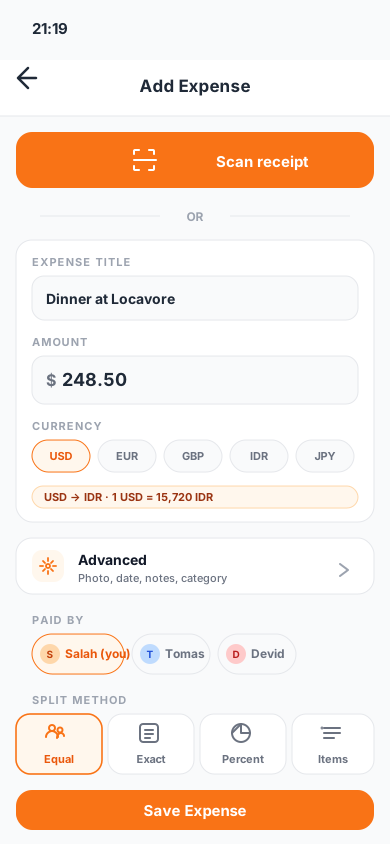
35 currencies: USD, EUR, GBP, JPY, MAD, SAR, AED, INR, BRL, and 26 more. Tracks spending in any currency.

Multi-Language

English, Español, Português, Deutsch, Français, 日本語, Svenska, Norsk — fully localized with RTL support.

Calendar Heat Map

Visual spending calendar showing daily intensity like GitHub's contribution graph. Tap any day to see that day's transactions.

Export PDF & CSV

Professional expense reports with multiple templates. Filter by date, category, merchant, or tags. Ready for your accountant.

Privacy & Security

Bank-level encryption, GDPR compliant, data never shared or sold. Secure cloud backup with automatic sync.

Why Monira is the Best AI Expense Tracker

Here's what sets Monira apart from Expensify, Smart Receipts, Wave, and others

AI Scanning Speed & Accuracy

  • 99.9% OCR accuracy on printed & digital receipts
  • Full line item extraction, not just totals
  • Works on crumpled, faded, and handwritten receipts
  • Scan via camera or import from photo gallery

Unmatched Analytics & Budgets

  • Interactive area, bar, line, and pie charts
  • Per-category monthly budgets with progress bars
  • Calendar heat-map for daily spending visualization
  • AI-generated spending insights & streaks

Global-Ready

  • 35 currencies with auto-conversion
  • 8 languages: EN, ES, PT, DE, FR, JA, SV, NO
  • Full RTL layout support
  • Works in any country, any currency

Free Forever, No Tricks

  • Free plan: AI scanning, budgets, analytics included
  • No credit card, no trial expiration
  • Optional Pro: weekly, monthly, yearly, or lifetime
  • 4.9★ rating from 10,000+ users
iOS EXCLUSIVE

Track Expenses From Your Home Screen

No other expense tracker offers this. Monira's iOS widgets show spending data, budget progress, and let you scan receipts — all without opening the app.

  • Small widget: Today's spending + monthly total
  • Medium widget: Category breakdown with progress bars
  • Large widget: Full dashboard + recent receipts
  • Quick actions: Tap to scan or manually add expense
Today
$42.50
This month
$1,247
62% of budget
Categories
Food$420
Shopping$310
Transport$180
Quick Actions
Add expense instantly

Who Uses Monira?

From freelancers to families — the best AI expense tracker for every use case

Small Business Owners

Scan receipts for tax deductions, compliance, and reimbursement. Export professional reports for your accountant.

Freelancers

Track project expenses, tag by client, export CSV for invoicing. Never miss a deductible expense again.

Travelers

35 currencies. Snap travel receipts instantly, keep trip costs under control in any currency worldwide.

Families

Track household expenses, set budgets per category, and monitor spending from your home screen widget.

Accountants

Manage receipts with smart categorization, digital archiving, and instant PDF report generation.

Students

Set a monthly budget, track every purchase, and build smart spending habits — all free, no credit card needed.

FAQ: Best AI Expense Tracker 2026

Common questions about AI expense trackers and receipt scanner apps

What is the best AI expense tracker app for 2026?
Monira is the top-rated AI expense tracker for 2026. It combines AI receipt scanning with 99.9% accuracy, budget tracking with per-category progress bars, spending analytics with interactive charts, iOS home screen widgets, 35 currencies, 8 languages, and PDF/CSV export — all with a free forever plan. No other app matches this feature set.
How does Monira compare to Expensify?
Monira offers several features that Expensify lacks: budget tracking per category, iOS home screen widgets, calendar heatmaps, 8 languages with RTL support, and a generous free forever plan. Expensify requires a paid subscription ($4.99+/month) for most features. See our comparison table for the full breakdown.
Is Monira free to use?
Yes. Monira offers a free forever plan with AI receipt scanning, expense tracking, budget management, and spending analytics. No credit card required. Optional Pro plans (weekly, monthly, yearly, or lifetime) unlock unlimited cloud storage and advanced PDF report templates.
What features should the best receipt scanner have?
In 2026, the best receipt scanner apps need: AI OCR scanning with line item extraction, auto-categorization, budget tracking, spending analytics with charts, multi-currency support, PDF/CSV export, cloud backup with encryption, and ideally iOS home screen widgets. Monira delivers all of these.
Can I track expenses in multiple currencies?
Yes. Monira supports 35 currencies including USD, EUR, GBP, JPY, CAD, AUD, MAD, SAR, AED, INR, BRL, MXN, CHF, KRW, and 21 more. It automatically handles currency formatting and symbols throughout the app.
Can I scan business and personal receipts?
Yes. Monira handles both business expenses and personal spending. Use custom categories and tags to keep them organized, then export separate reports for tax deductions, reimbursements, or personal budgeting.
Which platforms does Monira support?
Monira is currently available on iOS (iPhone & iPad) via the App Store. Android support is coming soon — download now for free and start tracking expenses today.

Try the Best AI Expense Tracker
Free on the App Store.

Join 10,000+ users who trust Monira to scan receipts, track budgets, and gain spending insights. Download free today.

Download Free on the
App Store
Free Forever Plan No Credit Card 35 Currencies • 8 Languages